Appearance
Cooordinate System
Tectly's coordinate system is based on normalized coordinates, where a point is described in reference to the dimensions of its parent container.
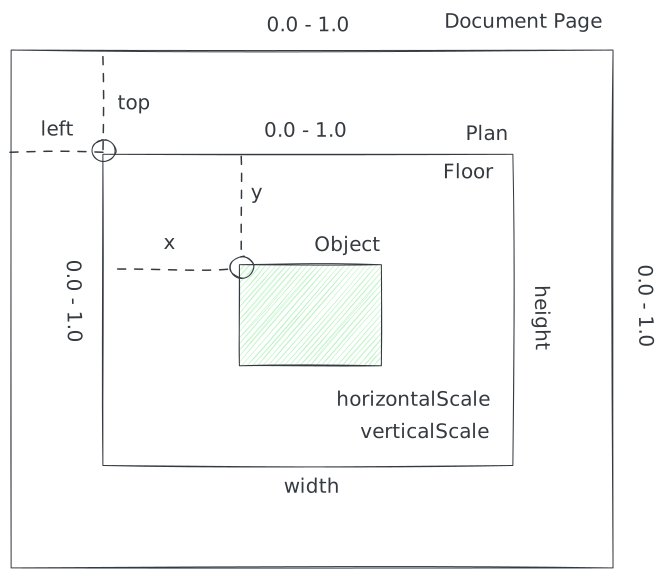
A document page has a specific aspect ratio. A plan found on the document page describes the section of the page it is contained in with left,top,width and heigt, where the values are beteen 0.0 and 1.0, relative to the size of the page. For example, a plan with the dimensions left=.25, top=.25, width=.5, height=.5 on a document page (or image) with 1000 x 1000px, describes the area starting left 250px, top 250px and having 500px in width and height.
We are using normalized coordinates to make Tectly's model independent of the actual image size/resolution and account for vector formats. The coordinates of all assets in a plan, are again represented as normalized coordinates with respect to the dimensions of the parent container, in that case the plan. So, to obtain the pixel coordinates of a room for instance in an image, each normalized point Pn(x,y) of the room boundardy must be denormalized to a point P(x,y) in pixel coordinates with:
P.x = image.width * (plan.left + (plan.width * Pn.x))
P.y = image.height * (plan.top + (plan.height * Pn.y))
The floor contains the two fields horizontalScale and verticalScale that tell which portion of the plan (horizontally and vertically) represent one meter in real world, assuming this information is available. For example, if the page width is 1500px, the plans page section is again left=.25, top=.25, width=.5, height=.5 and horizontalScale=.04. This means 1500px * .5 * 0.04 = 30px depicts 1m in real world.